i18n
General
The hub supports a number of languages (see list). Their translations live in the hub repo, one file per locale, and are edited by hand: see Adding and changing translations.
Hub language settings
Hub users can set their displayed language under their User settings.
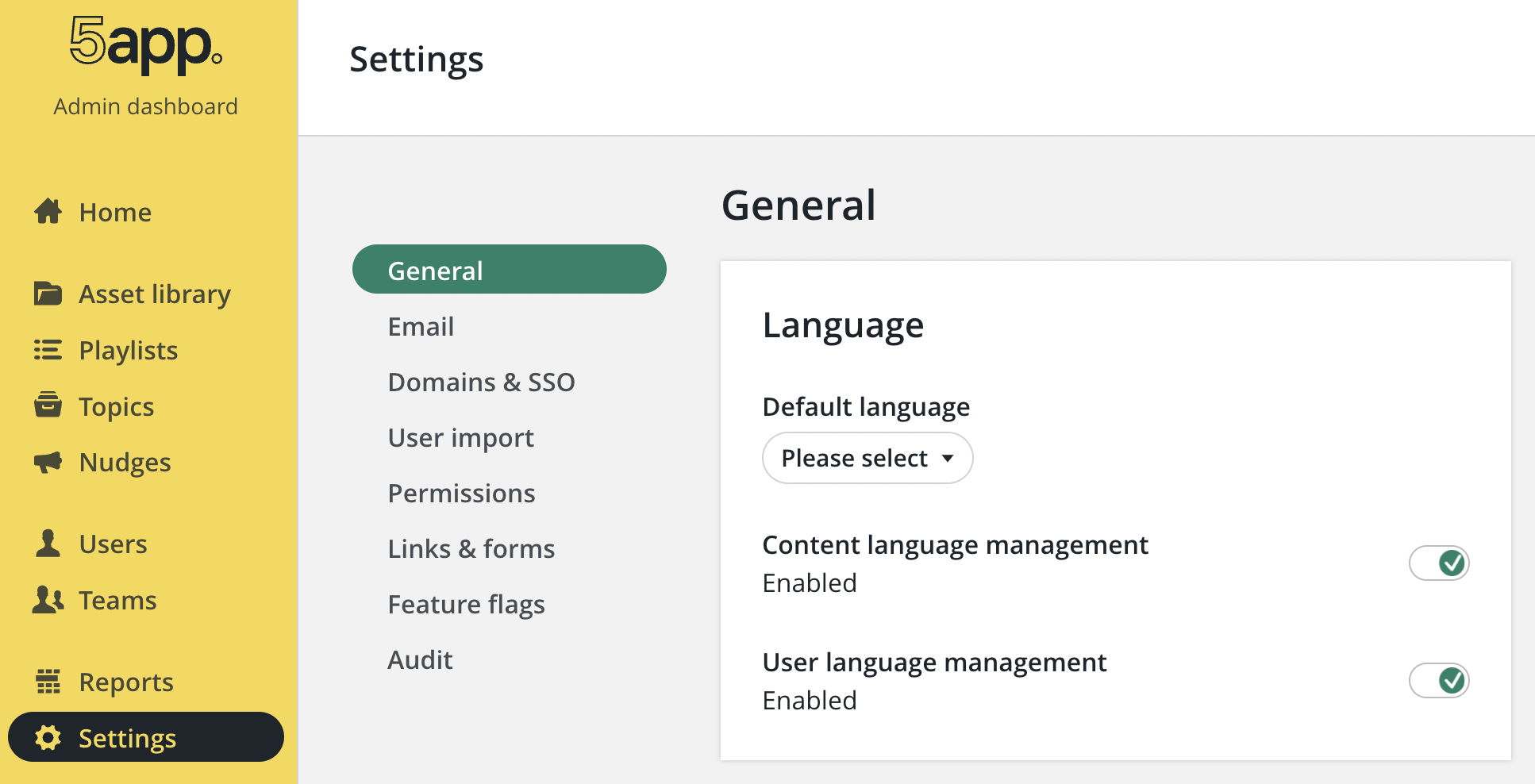
General language settings for a Hub can be found and set by a Hub owner under:
Settings → General → Language → Default language
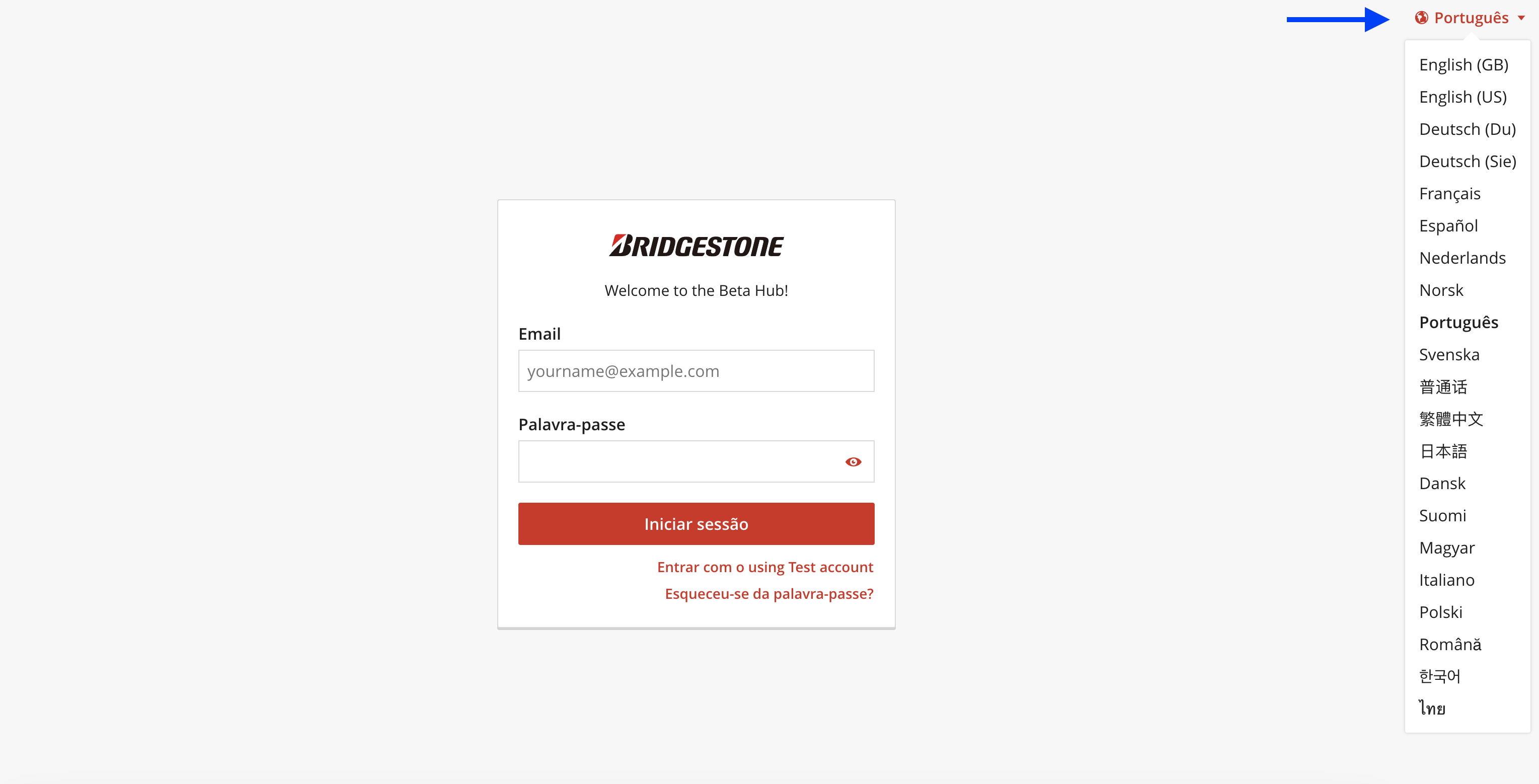
Alternatively, you can you click on the dropdown menu in the top right corner before logging in.
Using translations in the Hub
Use the useTranslation hook inside your functional components to access the translation function.
| Key | Description | en-GB |
|---|---|---|
analytics_activity_log | Activity log |
Usage in Hub:
import {useTranslation} from 'react-i18next';

function Component() {

	const {t} = useTranslation();

	return (
		<InlineStatsPanel.assetActivityLog
			title={t('analytics_activity_log')} // translation key
			data={asset}
		/>
	);
}
In some places, e.g. in basic functions or in old class components, the useTranslation hook cannot be utilised and we fallback to using i18n from i18next. The downside to using i18n is that it does not automatically retrigger if the user changes their user language. As such, the old language will be shown until the user refreshes the page.
| Key | Description | en-GB |
|---|---|---|
role_owner | Owner | |
role_admin | Admin | |
role_member | Member | |
role_user | User |
Usage in Hub:
import i18n from 'i18next';

function getRoleName(role) {
	const ROLE_NAMES = {
		admin: i18n.t('role_admin'),
		owner: i18n.t('role_owner'),
		member: i18n.t('role_member'),
		user: i18n.t('role_user'),
	};

	return ROLE_NAMES[role.toLowerCase()] || role;
}
DO test any new translations by changing the language in the Hub UI before putting them up for review.
See also: React i18n documentation - useTranslation Hook
Translations with dynamic parts
Dynamic values can be inserted into a translation. Simply pass the value through when using the translation key in the hub and then utilise it within the translation by wrapping it in two curly brackets. Multiple values can be passed through this way.
| Key | Description | en-GB |
|---|---|---|
form_uploaded_progress | Reads eg as: 67% uploaded | {{progress}} uploaded |
Usage in Hub:
	const progress = `${t('form_uploaded_progress', {
		progress: `${Math.ceil(uploadProgress)}%`,
	})}`;
When adding dynamic string values, other than dynamic numeric values, these might require additional translation. For example, avoid the following patterns:
❌ ** DON'T DO THIS: **
This would lead to English words appearing in the translations
// Given the translation: 'playlist_user_status': 'Playlist {{progress}}'

const statusLabel = t('playlist_user_status', {
	progress: isComplete ? 'completed' : 'in progress',
});
❌ ** DON'T DO THIS: **
Adding translated values should also be avoided due to differing grammar across languages
// Given the translation: 'playlist_user_status': 'Playlist {{progress}}'

const statusLabel = t('playlist_user_status', {
	progress: isComplete ? t('status_completed') : t('status_in_progress'),
});
Instead, it is better to simply add a completely new translation key for each dynamic string value.
✅ ** DO THIS: **
// Use two separate, complete translations:
// 'playlist_user_status_complete': 'Playlist completed'
// 'playlist_user_status_in_progress': 'Playlist in progress'

const statusLabel = isComplete
	? t('playlist_user_status_complete')
	: t('playlist_user_status_in_progress');
If a interpolated translation with dynamic values is needed, ensure that the dynamic string values are also translated correctly.
❗ DO test any new translations by changing the language in the Hub UI before putting them up for review.
See also: i18n documentation - Interpolation
Plurals in translations
i18next can automatically pluralise translations based on a passed-in count variable. For this to happen, add a basic key for the singular translation, and the same key ending in _plural for the pluralised translation.
| Key | Description | en-GB |
|---|---|---|
duration_days | {{count}} day | |
duration_days_plural | {{count}} days |
Usage in Hub:
When using the pluralised key in the hub, there is no need to add both translation keys (singular and plural). Instead, use only the singular key and i18n will automatically use the plural key when the count is not 1.
<MetricCard
	value={t('duration_days', {
		count: daysSinceLastAccess,
	})}
/>
The hub uses i18next 19, which picks between the two keys by locale:
| Locales | Shows the singular key for | So the singular needs {{count}} when the English has it |
|---|---|---|
| en, de, da, es, fi, hu, it, nl, no, pt, sv | 1 | No |
| fr | 0 and 1 | Yes |
| ru, pl, ro, zh-CN, zh-TW, ja, ko, th | every count | Yes, worded so it reads right for any number |
The last row never shows the _plural key. Those languages have more than two plural forms, or none, and i18next looks for numbered keys (duration_days_0, duration_days_1, duration_days_2) instead. The locale files don't have them, so i18next falls back to the singular.
See also: i18n documentation - Plurals
Translations with punctuation
For cases where a word/sentence is used with punctuation such as a colon :, we need to consider it as part of the translation.
This is due to differing grammar between languages, e.g. in French you'd put a space in front of the colon, whilst in English you don't.
| English | Date: |
|---|---|
| French | Date : |
Translations with colons
If the string to be translated is a single word with a colon, e.g. in the context of a form, we want to keep the translation as general and reusable as possible.
For these cases we use the prefix property and the ending colon
| Case | Translation key | EN translation |
|---|---|---|
| With colon | property_date_colon | Date: |
| Without colon | property_date | Date |
For cases where the string (with colon ) to be translated is a more specific use case and needs a more precise translation key (instead of property), we should still aim to add the colon ending.
Interpolating React elements and the Trans component
Trans lets you interpolate or translate complex React elements.
As long you have no React/HTML nodes integrated into a cohesive sentence (text formatting like strong, em, link components, maybe others), you won't need it - most of the times you will be using the t function.
| Key | Description | en-GB |
|---|---|---|
user_importer_drop_file_cta | Drop CSV file here or <1>browse</1> to upload | |
editable_item_delete_confirmation | Are you sure you want to delete <1><0>{{name}}</0></1>? |
Usage in Hub:
When using the Trans component in the hub, pass in the translation key as the i18nKey prop.
Pass in any components as children to the Trans component.
const BrowseLink = ({children}) => (
	<>
		<br />
		<TextLink as="span">{children}</TextLink>
	</>
);

<Trans t={t} i18nKey="user_importer_drop_file_cta">
	Drop CSV file here or
	{<BrowseLink>browse</BrowseLink>} to upload
</Trans>
const {name} = props;

<Trans
	t={t}
	i18nKey="editable_item_delete_confirmation"
	name={name}
>
	Are you sure you want to delete
	<strong>{name}</strong>?
</Trans>
See also: React i18n documentation - Trans component
Updating email translations
Email templates are translated files in the hub too, one per template type and locale. See Adding or updating email templates.
Adding and changing translations
Translations are edited by hand in the hub, in frontend/src/common/i18n/, with one .js file per locale. A string ships with every one of its translations in the same pull request, and a fix made in review stays fixed, since nothing regenerates the files.
The translations skill in the hub (.claude/skills/translations/SKILL.md) has the same steps for Claude Code.
The locale files
| File | Holds |
|---|---|
en-GB.js | The source: every key, in English |
de-DE.js, fr-FR.js and the other locales | Every key in en-GB.js, in the same order, so a key sits on the same line in every file |
en-US.js | Only the strings whose US spelling or wording differs: analyze, organization, color, "Check" for "Tick" |
de-DE-Sie.js | Only the strings whose formal "Sie" wording differs from de-DE.js, which uses "du" |
en-US.js and de-DE-Sie.js spread in their base file and override it. zh-TW.js also imports zh-CN.js, but it translates every key itself.
Some things to match when writing a translation:
-
pt-PT.jsis written in Brazilian Portuguese (você, arquivo, tela). -
Each locale has a fixed form of "you": formal in French, Romanian and Russian; informal in German (
de-DE), Spanish, Italian, Dutch, Polish, Hungarian and the Nordic languages; polite in Chinese, Japanese, Korean and Thai. -
Some terms are fixed per locale:
Term Locale terms hub Hub(de),hub(da, fr, hu, it, nl, no, pl, pt, ro),hubb(sv),hubi(fi),centro(es),хаб(ru),中心(zh),ハブ(ja),허브(ko),ฮับ(th)upload importer(fr),lähettää, buttonLähetä(fi).téléchargerandladatamean downloading onlydiscard Abandonner(fr), which reads as neither deleting nor ignoringnudge Stupser(de),nudge(da, fr, nl),knuff(sv),dytt(no),nykäys(fi),empujón(es),cutucada(pt),sollecito(it),ghiont(ro),szturchnięcie(pl),bökés(hu),подталкивание(ru),轻推/輕推(zh),ナッジ(ja),넛지(ko),การกระตุ้นเตือน(th)reminder Erinnerung(de),herinnering(nl),påminnelse(sv, no),påmindelse(da),muistutus(fi),recordatorio(es),lembrete(pt),promemoria(it),rappel(fr),memento(ro),przypomnienie(pl),emlékeztető(hu),напоминание(ru),提醒(zh),リマインダー(ja),리마인더(ko),การเตือนความจำ(th). Never the locale's word for a notification
Values are single-quoted strings. English uses ’ for apostrophes so it never needs escaping; the other locales escape a straight apostrophe as \'.
Adding a new translation key
Keys are lowercase letters, digits and underscores, and are grouped by prefix: alerts begin with alert_, actions with actions_, and so on. A key that doesn't clearly belong to a group goes next to the copy that appears close by in the UI.
| Key | en-GB |
|---|---|
actions_add | Add |
actions_add_content | Add content |
alert_topic_deleted_success | Topic deleted successfully |
alert_topic_deleted_error | Topic could not be deleted |
While a feature is being built, the English alone is enough: every locale falls back to en-GB, so the UI reads properly in every language. The other locales have to be added before the pull request merges, and the locale test fails until they are.
The German is written by hand, because it settles what the English leaves open, such as whether "Keep" is a verb and what it keeps. Translate the other locales from both. A machine translation is a fine first draft, as long as every value is checked.
Checking translations
Short labels go wrong most often, because they have no context. Look for:
- The wrong sense of a word. "Next" translated as "further", "Pause" as "stop", "Play" as "reproduction", "Keep" as "maintain".
- Two labels shown together that say the same thing. Pause and Stop, or Upload and Download.
- Text that doesn't match its button. A confirmation that says "delete" above a button that says "Discard".
- A word the file already translates differently. Grep the locale's file for the existing term, such as the word for "transcript", and use it.
- The wrong form of "you" for that locale.
- Punctuation the English doesn't have. A label or title shouldn't gain a full stop.
- A missing or renamed placeholder or tag.
{{name}},<1>…</1>and<strong>…</strong>keep their English names and numbers, and every one the English has must be there. A missing placeholder drops a name or number from the sentence; one with any other name is never filled, and users see it as typed. The locale test catches these.
List the new strings in the pull request, so a reviewer who reads the language can check them.
Changing a translation
Change the string in every locale. Nothing retranslates automatically, so a locale left alone keeps the old meaning. When only the English wording changes and the meaning stays the same, the translations may not need to change; say so in the pull request.
Removing a translation key
Delete the key from every locale file, en-US.js and de-DE-Sie.js included, once nothing uses it.
The locale test
frontend/test/common/i18n/locales.test.ts runs with the frontend's Jest tests in CI, and checks that:
- every key is made of lowercase letters, digits and underscores, and appears once per file
- every locale has every key in
en-GB.js, and no others en-US.jsandde-DE-Sie.jsonly override keys their base file has- a translation has every placeholder the English has, and no others.
{{count}}may be left out of a singular only in the locales that show it just for 1 (see Plurals in translations), and may be added anywhere, since i18next passes it to every plural - a translation has the same tags as the English, and closes every tag it opens
cd frontend && npx jest test/common/i18n
It can't tell whether a translation is right, so the values still need checking.
Missing translations
In case a translation string is missing for a key in the language used in the hub, the string of the fallback language is shown.
The default fallback language is en-GB, however Hub owners can set a different fallback language via the Default Hub Language option.
Supported languages
| Locale | Hub Language |
|---|---|
| da-DK | Danish |
| de-DE | German (Du) |
| de-DE-Sie | German (Sie) |
| en-GB | English |
| en-US | US English |
| es-ES | Spanish |
| fi-FI | Finnish |
| fr-FR | French |
| hu-HU | Hungarian |
| it-IT | Italian |
| ja-JP | Japanese |
| ko-KR | Korean |
| nl-NL | Dutch |
| no-NO | Norwegian |
| pl-PL | Polish |
| pt-PT | Portuguese |
| ro-RO | Romanian |
| ru-RU | Russian |
| sv-SE | Swedish |
| th-TH | Thai |
| zh-CN | Chinese |
| zh-TW | Chinese (Traditional) |