User roles 👥
There are several levels of roles with varying permissions / priviliges for Hub users.
These user roles are used to hide or show content and features based on permission levels. As such, depending on the permission level of the user with which you login, the UI of the Hub varies.
Overview of roles
| Super User | Owner | Admin | Team manager | Member | |
|---|---|---|---|---|---|
| Info | 5app employees | Main client who manages the Hub | Any user with Admin permissions | User managing team(s) | Basic Hub user |
| Set Hub theme | ✅ | ||||
| Change Hub settings | ✅ | ✅ | |||
| Access Admin dashboard | ✅ | ✅ | ✅ | ||
| Manage Assets | ✅ | ✅ | Depending on set Admin permission | ||
| Manage Playlists & Topics | ✅ | ✅ | Depending on set Admin permission | ||
| Manage Nudges | ✅ | ✅ | Depending on set Admin permission | ||
| Manage Users & Teams | ✅ | ✅ | Depending on set Admin permission | ||
| Manage Reports | ✅ | ✅ | Depending on set Admin permission | ||
| Manage teams under "My Teams" in Hub | ✅ | ✅ | ✅ | ✅ | |
| Manage own user profile | ✅ | ✅ | ✅ | ✅ | ✅ |
Setting user roles
To set the role of a user, the Role panel on the user page in the admin dashboard is used.
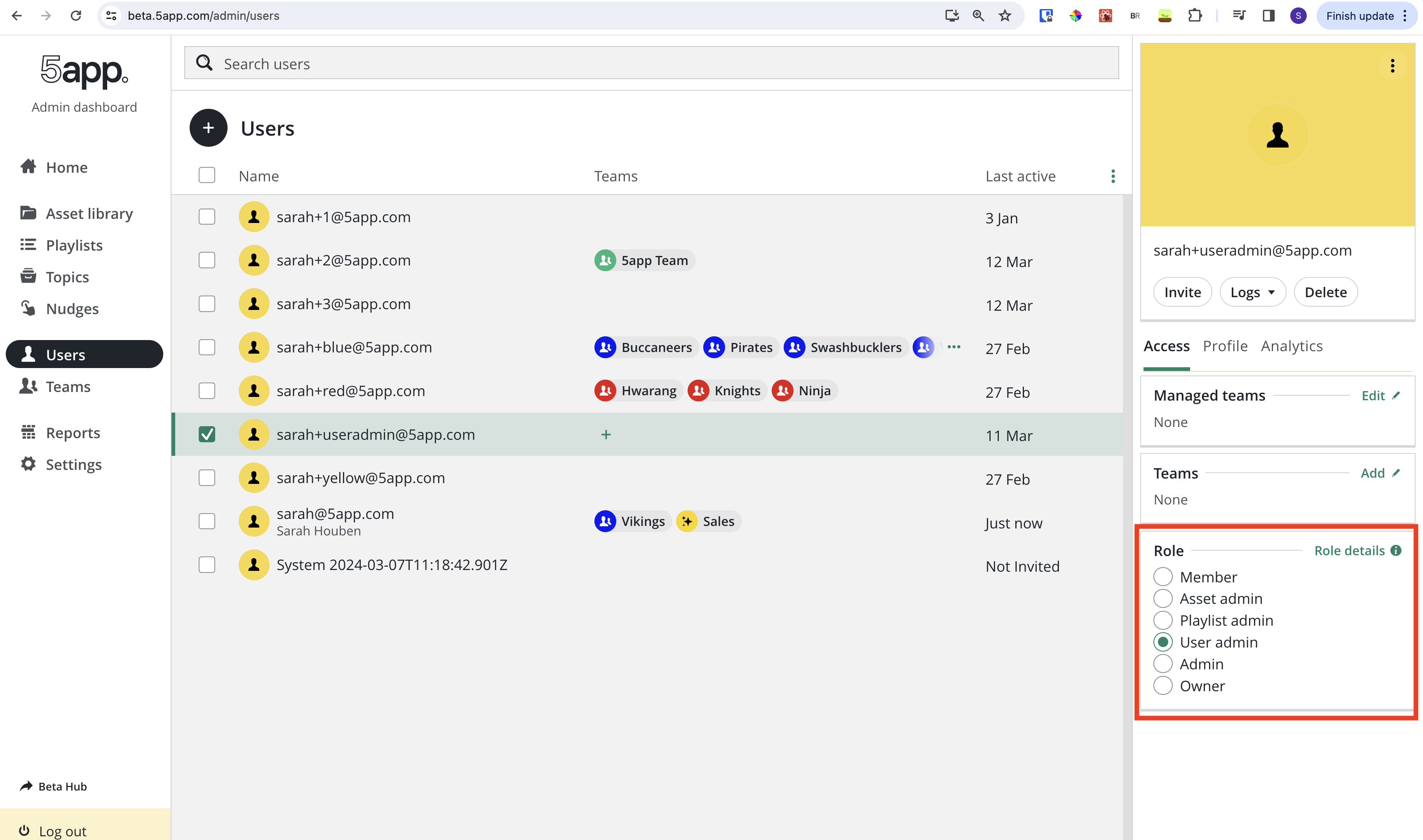
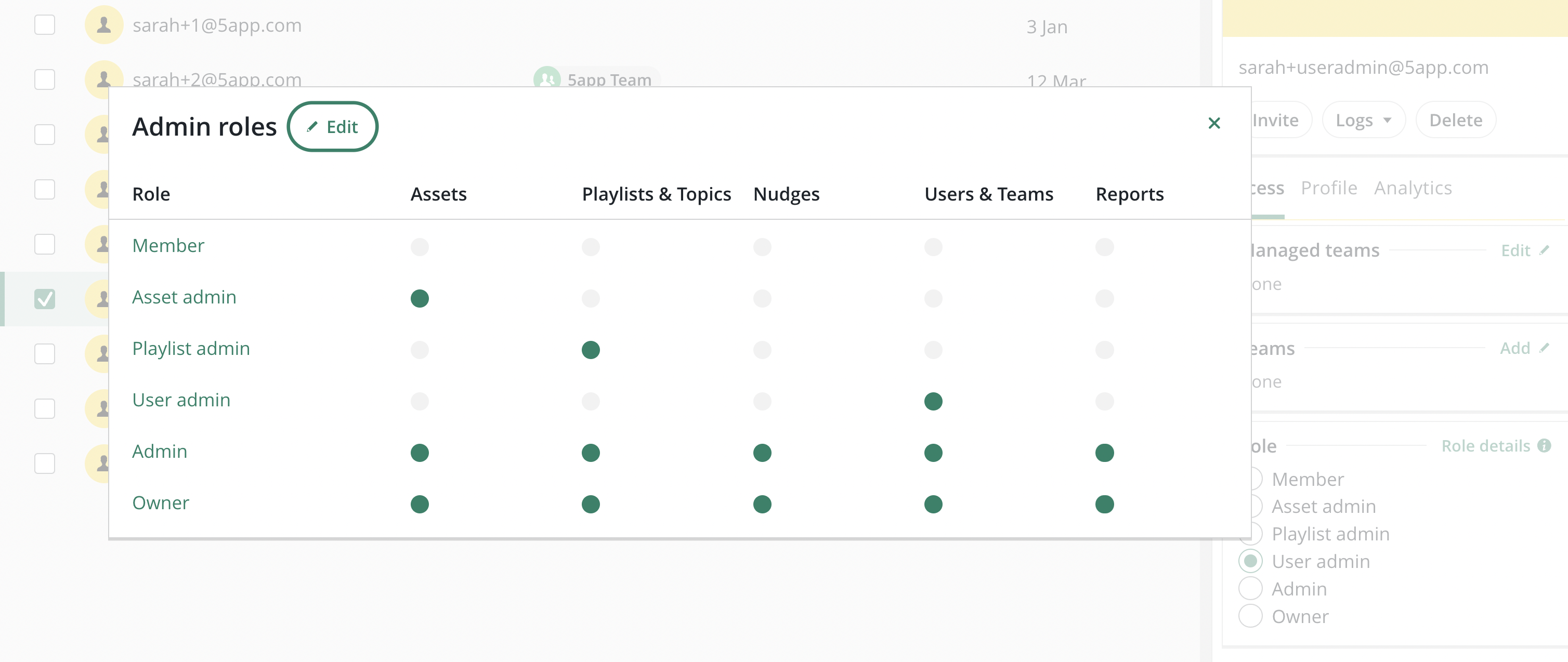
Details regarding the permissions / privileges of each role can be found under the Role details info modal. This also leads to an edit UI in which further granular permissions / privileges can be set for admins.
Editing user roles
The majority of user roles (Super user, Owner, Admin, Basic users) cannot have their privileges changed. However, it is possible to edit and assign new granular admin roles via the Admin Roles Settings page.
The page can be reached via:
Admin dashboard → Settings → Admin Roles
Admin dashboard → Users → Selected User → Role details → Edit → Admin Roles
Read / Write permission levels
Via the UI, we currently do not distinguish between Read/Write access, e.g. if a role has the Assets role, a user with that role can read and write assets.
In the code base, we do however use the more granular permission level. E.g. some features are only accessible if the user has the Write privilege. Further changes around this might be introduced in the future and we might allow users to have these more granular settings in roles.
Currently, when a user has a Write permission, they also by default have the equivalent Read permission.
User roles in the database
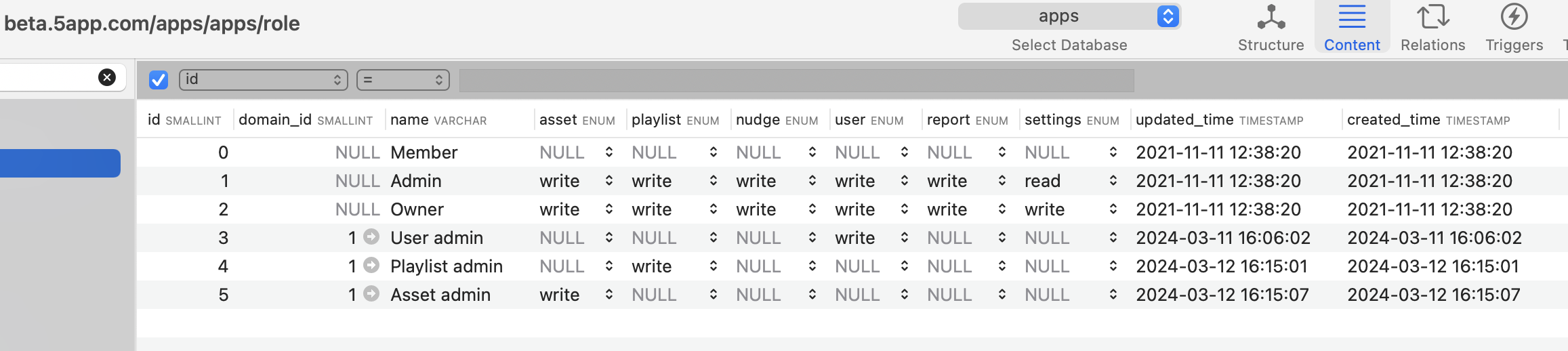
Details for each role is stored in the roles table in the database.
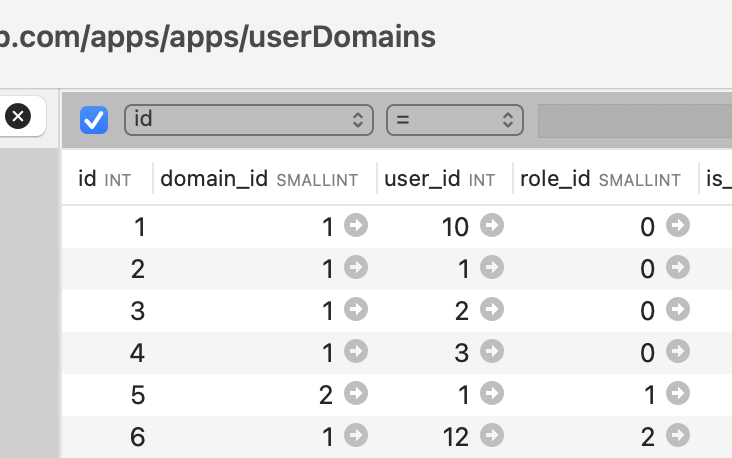
Roles are assigned to users and stored via the userDomains table.
Setting the super user role
Super users are not assigned via the UI. Instead, this is an additional user role which is assigned via direct entry into the database in the users table.
Users which are super users also have an additional user role, e.g. owner.

Using user roles
User roles are used to determine what content and features a user can have access to based on their permission levels.
E.g. while new features which are being developed, or any settings we do not want clients to be able to change, are made only accessible to super users.
Along the same lines, only owners or super users can access any features regarding any hub settings.
Frontend
In the frontend, we use the FE hasPrivilege util to check whether a user has the required role / permissions to access a feature.
This util and further utils around privileges can be found under frontend/src/common/utils/privileges.
An overview of the roles and permissions can be found under frontend/src/common/utils/privileges/constants.ts.
Usage examples
import {hasPrivilege, USER_READ, ASSET_WRITE} from 'utils/privileges';

function SingleAssetInspectorView({
...

const isAssetAdmin = hasPrivilege(ASSET_WRITE);

....

  return (
    <>
     <MarkAsDoneModePanel
			disabled={!isAssetAdmin}
			onUpdate={updateMarkAsDoneMode}
		/>

	{hasPrivilege(USER_READ) && (
		<>
			<InlineStatsPanel.assetPopularUsers
				title={t('analytics_most_active_users')}
				data={asset}
			/>
		</>
		)}
    </>
  )
})
Backend
Routes and privileges
In the backend, we use the BE hasPrivilege util.
This util and further utils around privileges can be found under api/utils/privileges.js.
We use the util to safeguard routes from users which do not have the relevant permissions to access the routes.
Usage examples
import {hasPrivilege, PLAYLIST_WRITE} from '../../../utils/privileges.js';

export function isManagerOfPlaylistOwningTeamOrAdmin() {

		// Is the user a playlist admin --> allow access
		if (hasPrivilege(role, PLAYLIST_WRITE)) {
			next();
			return;
		}

....

		// deny access by default
		next(unauthorisedError());
}
Dare and privileges
In some of the modelsRest files, we check the permissions, to ensure that certain tasks can only be performed if a user has the relevant permission.
For this, we use the util mustHavePrivilege which can be found under api/db/modelsRest/_utils.js.
Usage examples
import {mustHavePrivilege} from './_utils.js';

async function patch(options, dareInstance) {

	// Check if user has atleast one of the required privileges
	mustHavePrivilege(options, dareInstance, [ASSET_WRITE, PLAYLIST_WRITE]);

....
	dareInstance.after = async resp => {
....
		return resp;
	};
}